What is JSON? A simple JSON example
JSON in two minutes — a real example object, a plain array, and what they look like when Fast JSON Viewer turns them into an interactive graph.
What is JSON?
JSON — JavaScript Object Notation — is a lightweight, text-based format for storing and exchanging data. It is human-readable, language-independent, and is the default way web APIs, config files, and log lines move structured data around. A JSON document is built from just two container types — objects ({ }, unordered key/value pairs) and arrays ([ ], ordered lists) — wrapping four scalar types: strings, numbers, the booleans true/false, and null. That is the whole language. It is standardised by RFC 8259 and ECMA-404.
A simple JSON example
Here is a small but complete JSON object — a widget definition with a nested window, an image, and a text label. Notice the three things JSON gives you: keys in quotes, values of mixed types, and nesting (objects inside an object):
{
  "widget": {
    "debug": "off",
    "window": {
      "title": "Updated Weather Widget",
      "name": "dashboard_window",
      "width": 800,
      "height": 600
    },
    "image": {
      "src": "Images/Moon.png",
      "name": "moon1",
      "hOffset": 320,
      "vOffset": 280,
      "alignment": "right"
    },
    "text": {
      "data": "Open Widget",
      "size": 42,
      "style": "italic",
      "name": "label1",
      "hOffset": 300,
      "vOffset": 120,
      "alignment": "left",
      "onMouseUp": "moon1.opacity = (moon1.opacity / 100) * 75;"
    }
  }
}
Reading this flat text top-to-bottom, it is hard to see the shape at a glance. Paste it into Fast JSON Viewer and open the Graphical tab (press 7) and the same bytes become a node graph: every object and array is a card, scalar fields are colour-coded rows, and nested containers are joined by edges.
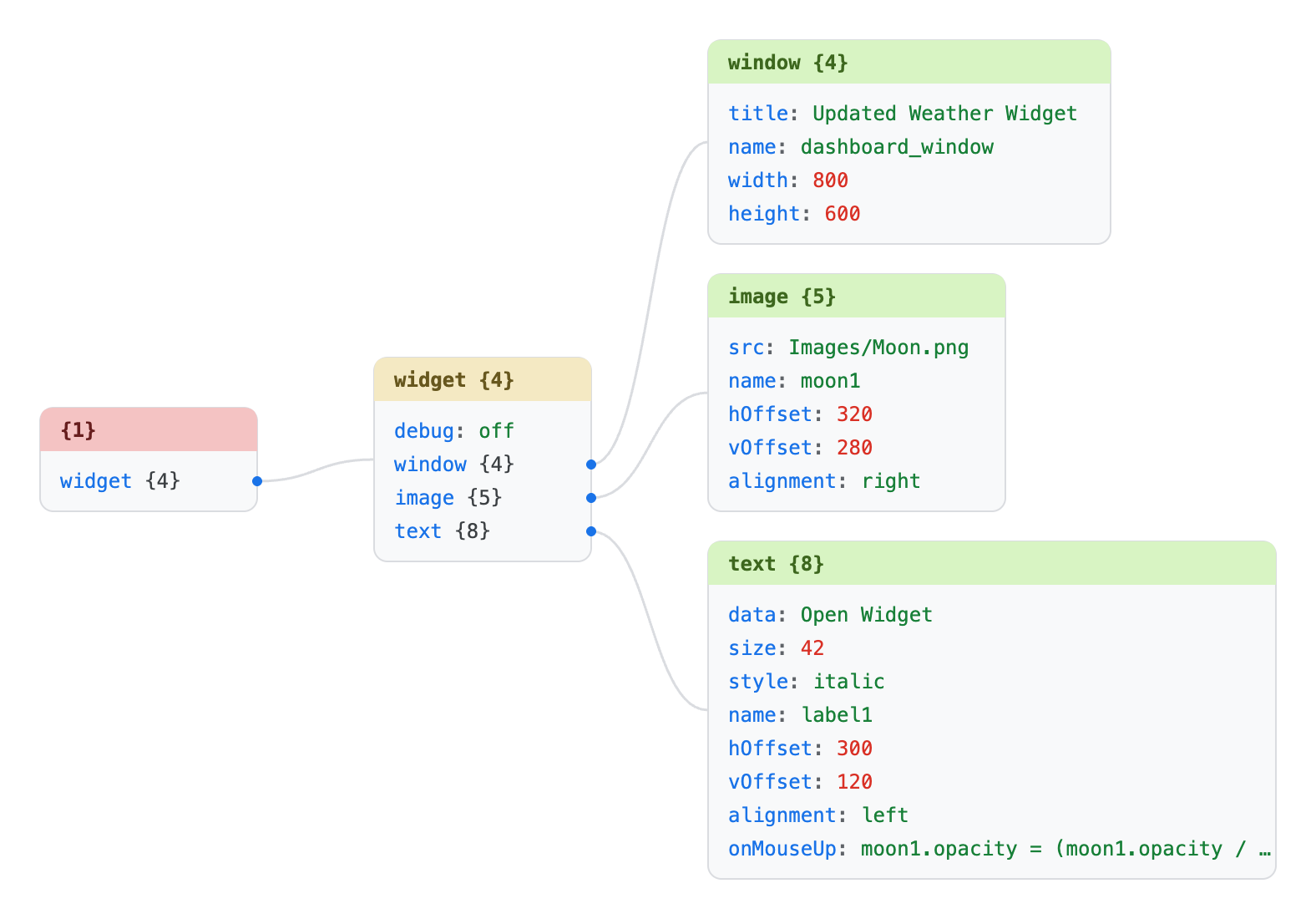
widget object branches into window, image, and text cards — the structure you had to trace by eye in the raw text is now spatial. Drag cards to rearrange, scroll to zoom, and click Download PNG to export the diagram.A simple JSON array
An array is an ordered list of values. This one holds ten strings:
[
  "item1",
  "item2",
  "item3",
  "item4",
  "item5",
  "item6",
  "item7",
  "item8",
  "item9",
  "item10"
]
In the Graphical tab the array becomes a single card whose rows are indexed 0…9 — making the ordering, and the count, immediately obvious:
![Graphical JSON visualization of a ten-element string array in Fast JSON Viewer: one card labelled [10] with rows indexed 0 through 9, each holding item1 through item10.](./img/json-array-graph-visualization-example.png)
[10] header shows the element count; each row pairs the zero-based index with its string value.Both diagrams above were produced by the viewer itself — no server, no upload. The graph is built in a background web worker and drawn as plain SVG, so it works the same on a two-line array or a multi-gigabyte document (large files show a partial graph of the first several thousand nodes to stay fast).
Open either example below and the viewer drops you straight into the Graphical tab — a share link can pick the landing tab with &view=graphical on the URL (also raw, hex, yaml, csv, or the default viewer):
⊹ Open the widget as a graph → ⊹ Open the array as a graph →
Prefer the plain formatted view? open the widget in the default viewer instead.
The full JSON grammar
JSON is small enough that its entire grammar fits on one screen. This is the ABNF from RFC 8259 (the %xNN notation gives the hex code point of each literal character):
; A JSON text is a single value, optionally surrounded by whitespace.
JSON-text = ws value ws

; Structural characters (each may be padded with whitespace).
begin-array     = ws %x5B ws  ; [  left  square bracket
begin-object    = ws %x7B ws  ; {  left  curly  bracket
end-array       = ws %x5D ws  ; ]  right square bracket
end-object      = ws %x7D ws  ; }  right curly  bracket
name-separator  = ws %x3A ws  ; :  colon
value-separator = ws %x2C ws  ; ,  comma

; Insignificant whitespace: space, tab, LF, CR.
ws = *( %x20 / %x09 / %x0A / %x0D )

; A value is exactly one of seven things.
value = false / null / true / object / array / number / string

false = %x66.61.6c.73.65       ; false
null  = %x6e.75.6c.6c          ; null
true  = %x74.72.75.65          ; true

; Objects: zero or more "key": value members.
object = begin-object [ member *( value-separator member ) ] end-object
member = string name-separator value

; Arrays: zero or more comma-separated values.
array = begin-array [ value *( value-separator value ) ] end-array

; Numbers: optional sign, integer, optional fraction and exponent.
number        = [ minus ] int [ frac ] [ exp ]
decimal-point = %x2E           ; .
digit1-9      = %x31-39        ; 1-9
e             = %x65 / %x45    ; e E
exp           = e [ minus / plus ] 1*DIGIT
frac          = decimal-point 1*DIGIT
int           = zero / ( digit1-9 *DIGIT )
minus         = %x2D           ; -
plus          = %x2B           ; +
zero          = %x30           ; 0

; Strings: double-quoted, with a fixed set of escapes.
string         = quotation-mark *char quotation-mark
char           = unescaped /
                 escape ( %x22 /        ; "  quotation mark
                          %x5C /        ; \  reverse solidus
                          %x2F /        ; /  solidus
                          %x62 /        ; b  backspace
                          %x66 /        ; f  form feed
                          %x6E /        ; n  line feed
                          %x72 /        ; r  carriage return
                          %x74 /        ; t  tab
                          %x75 4HEXDIG ) ; uXXXX
escape         = %x5C          ; \
quotation-mark = %x22          ; "
unescaped      = %x20-21 / %x23-5B / %x5D-10FFFF
That is the complete specification of what is and is not valid JSON. Everything else — pretty-printing, comments handling, trailing-comma tolerance — is a convention layered on top by individual tools, not part of the format.
How do you know a viewer follows the grammar?
A format this small still has sharp edges: leading zeros, lone surrogate escapes, depth limits, duplicate keys, raw control characters. Fast JSON Viewer ships a fixture suite that exercises every one of these against the grammar above — the valid files must be accepted, the malformed files must be rejected at the exact failing byte.
Read the conformance test-suite breakdown → Browse the live test suite